NexaPixel combines conversational AI with portrait generation on Android
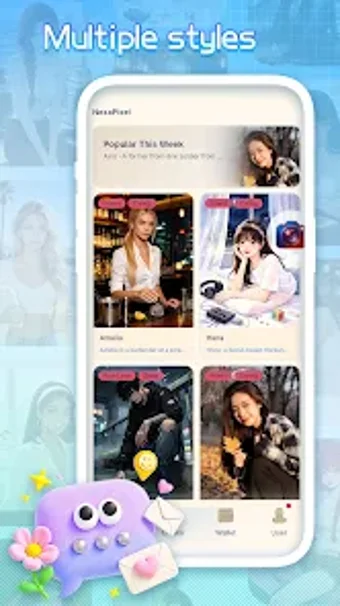
NexaPixel, developed by GoldLong, is an Android utility that pairs conversational AI with automated portrait creation for mobile users. The app lets users hold natural-language dialogues with an integrated assistant while also producing or enhancing stylized portraits via on-device prompts routed to cloud models. Primary features include immersive chat, targeted portrait generation, and a streamlined interface oriented toward everyday creative tasks. Android users interested in conversational tools and portrait art will find practical creative value in this combination.
What does NexaPixel do for chat and image workflows?
The app merges two functions: an interactive AI assistant and a portrait generator. The assistant accepts natural-language input and returns conversational replies, while the portrait feature accepts prompts or source images to produce stylized digital portraits. Combining both in one package means a user can refine a prompt in chat, then send it to the portrait generator without switching apps, which preserves the iterative workflow between idea and final image.
Does NexaPixel affect device resources during generation?
Portrait creation and conversational processing run through cloud-based models, so the heavy computation occurs off-device; the app therefore depends on a stable internet connection to process requests. Local CPU and RAM use remain limited to UI rendering and network handling, which reduces on-device strain during both chat sessions and image generation compared with fully local model execution.
Is it safe to use with personal images and does it require technical skill?
The tool requires network access to send prompts and images to remote models, which means users should consider data handling policies before uploading sensitive photos. The interface is designed for direct operation: chat-driven prompt refinement and one-tap image generation aim to lower the technical barrier, making it suitable for hobbyists and creators who prefer guided interactions over manual image editing pipelines.
NexaPixel is a practical hybrid for casual creators and curious users
NexaPixel is a capable option for Android users who want both conversational AI and portrait generation in one app, with cloud processing reducing local resource use. The dependence on networked models is a trade-off for quality and speed, so users handling sensitive images should weigh data sharing implications. Recommended.